 le
lePayHole for Android
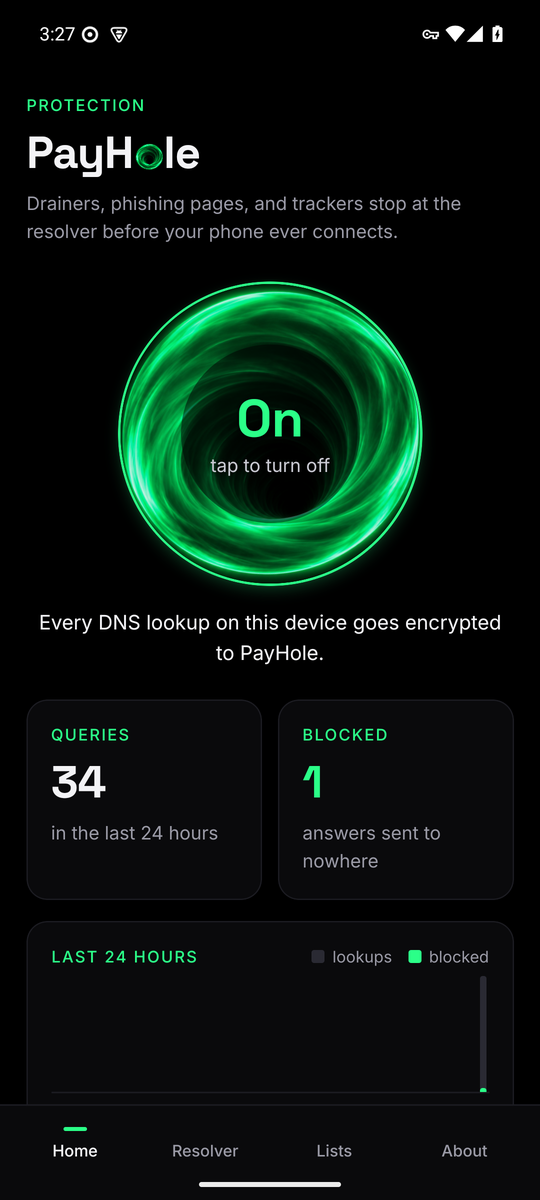
One tap routes every lookup on the phone through encrypted DNS to the PayHole resolver. The app shows what it blocked and keeps a 24-hour graph. Beta APK today, the stores next.
Until now a phone got PayHole's protection through a system setting: a signed profile on iPhone, Private DNS on Android. That works, and it stays available, but it is invisible. Nothing tells you what was stopped, and nothing shows the moment a drainer link failed to load. The app fixes that.
What it does
One tap. The app opens a DNS-only tunnel on the phone: the only thing routed into it is the address your apps use for DNS, so everything else keeps its normal path and its normal speed. Every lookup is forwarded to the resolver over HTTPS, with DNS over TLS as the fallback when a network blocks HTTPS resolvers. It covers every app on the phone, on Wi-Fi and on mobile data, and it stays up when the screen is locked.
The resolver is the public PayHole node by default. It runs the merged ScamSniffer scam database, the Phishing.Database active phishing domains, and the StevenBlack ad and tracker list, about 820,000 names, reloads them every six hours, and keeps no query log. If you run your own Sinkhole node with the encrypted listeners on, point the app at it from the Resolver tab and your phone follows your node instead.
What you see
- The ring. It turns while protection is on. The spin is one transform on the graphics layer, runs only while the app is open, and stops the moment you switch away, so it costs nothing while the phone sits in your pocket.
- Queries and blocked, over the last 24 hours, and the last twenty blocked names.
- A 24-hour graph in half-hour slices. Grey is every lookup, green is what the resolver blocked. Counts live in the app's private storage, so they survive restarts and reboots.
- A resolver check that reports the answer time and the record count. It does not print addresses.
What it does not do
No account, no sign-in, no analytics. Nothing leaves the phone except the DNS queries themselves, and those go to the resolver you chose, encrypted. The public resolver keeps no query log. The PayHole token is never paid out to anyone, including for using the app or running a node. Payments in PayHole are USDG, and the protocol's share only ever buys and burns.
Install the beta
- Open payhole.org/downloads/payhole.apk in Chrome on the phone. The file is about 70 MB because it carries every Android CPU build; the store build will be a quarter of that.
- Tap the download. Android asks to allow installs from your browser. Allow it once, then Install.
- Open PayHole and tap the ring. Android asks for permission to set up a VPN connection, which is how a DNS-only tunnel works on Android. Accept it. On newer Android it also asks to show notifications, for the small status entry while the tunnel is up.
This beta is signed with a development key. When the Play Store build arrives you will need to uninstall the beta first, because store builds use a different key. Your counts start fresh.
Private DNS in Android settings still works if you prefer not to install anything. Keep it off, or
set to dns.payhole.org, while the tunnel is on.
iPhone
The iOS app is written and installs a system-wide encrypted DNS setting through Apple's DNS settings API, which is why counters there are the system's business and not the app's. It ships once the developer enrollment clears. Until then the signed profile does the same job.
What comes next
The pocket: a small USDG budget on your phone that pays for content, tools, and agents automatically over x402, and lets you pick and pay the operator whose resolver you use. Operators earn USDG from the phones that choose them; the protocol's share buys and burns.
The source is in the repository under packages/app. Bugs
and ideas: hello@payhole.org or the issue tracker.
All posts